Showing posts sorted by relevance for query geg. Sort by date Show all posts

Wednesday, December 29, 2021

2022 Tech Challenge Time!

Last year, I participated in a 10-week tech challenge hosted by the Google Educator Group of Michigan.  Some weeks I revisited forgotten tools, some weeks were a fun task with favorite tools, and some weeks brought me brand new tools!  This year's challenge sign-up closes on Friday, January 7 and I just signed up for the fun!

If you're interested in some ed tech fun, you may want to consider joining.  Here's the deets:

"Your challenge, if you choose to accept it, is to learn some helpful tech tools and earn awesome badges. Each week for 10 weeks I will post an easy and short tech challenge (some of which you might have already done before). Each challenge is posted with my "how-to" steps to help you succeed. 

  • If you complete the challenge you will be awarded that challenge's badge to show off your awesomeness! 

  • If you complete the challenge in the assigned week you will also earn a point to be added to the Leaderboard on the GEG Michigan Tech Challenge website (you will choose a username so others will not know who is in the competition if you want to remain secret)."

Check out the 2022 Tech Challenge website to see what it's all about.  If it sounds like something fun, join the GEG Michigan group and you'll get the link to sign-up!
It's organized by Jeremy Badiner, who, if you haven't seen present, you're going to want to check him out cause he always has fun and informative sessions!

//

Wednesday, January 12, 2022

Gif me!

This may seem odd, especially for a tech educator, but I just made my first gif this week! And you know what? It was way easier than I thought it would be!

The first challenge in this year's GEG tech challenge was to create a gif using Screencastify.  Now, I love Screencastify and use it for everything. But I've never used it to create a gif before. 

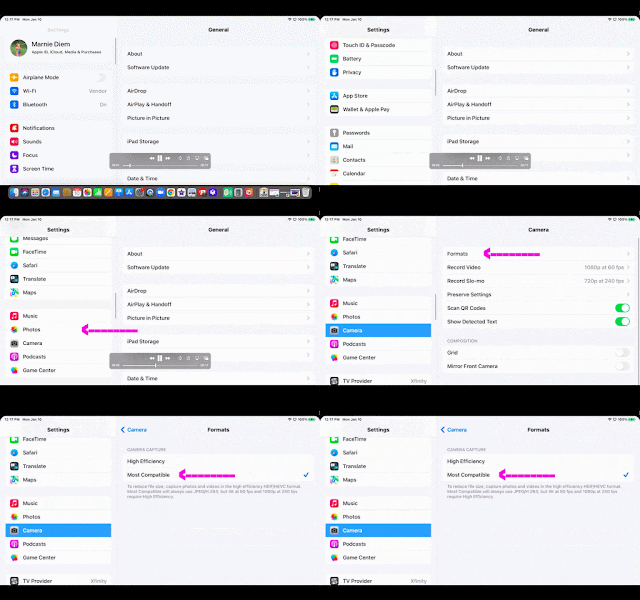
My first attempt literally was a blank... literally drawing a blank. But my second attempt was actually something useful! All our ECC teachers got new iPads right before the December break. And while I did get everything set up, I forgot to do one thing... If you're stuck on how to get your iPhone photos to be more user friendly, and not that HEIC format, check this out -->

It helped me learn how to create a gif, and it helped out my teachers in the process!

I can't wait to see what next week's tech challenge brings!

//


Sunday, May 9, 2021

Fun with Fonts

Want a fun and simple way to add a bit of pizzazz to your Slides and Documents? Check out these Text Generators! All are free and web based - the only download is your finished product!  (And perfect additions to end-of-the year certificates and slides and such!)


Cool Text

Text Giraffe


Curve Text


TextAnim


This site let you copy and paste fun text into Google Classroom and such!


P.S.  I learned about these in the GEG MI Tech Challenge.  Look for it next year if you want to join in, too.  It was a blast!