Showing posts with label GEG. Show all posts

Friday, February 4, 2022

Tools Galore!

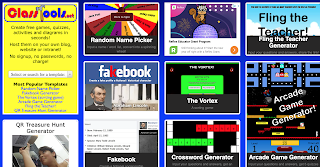
This week's tech challenge was to explore the website ClassTools.net which is a collection of tools that run the gamut from fake tweets and sms text generators to historical tools and puzzle makers.

I've gotta be honest, at first glance, the site isn't much to look at. It's kind of vintage web and a bit cluttered. 
BUT. 

It's also a ton of fun! One of those sites where you're on it for only five minutes, and yet somehow, an hour passes.

Fling the teacher is a customizable quiz game where yes, you can upload any picture and fling away. The Tarsia Puzzle Generator adds a new layer to those triangular puzzles with whatever custom questions a teacher enters. Below are two of the tools that I played with - both super simple and with so many uses in the classroom! 
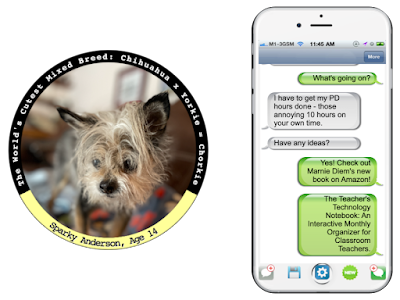
The sample in the badge maker is to use it with historical figures. It can be used for anything you can imagine - from vocabulary to science concepts and anything in between!  The SMS Text Generator would be great for character conversations, foreign language practice... anything the mind can dream of!

//


Monday, January 31, 2022

It's a Comic!

First time in a long time that I made a comic in Pixton! It was super simple, easy enough for even kids to use!

The week three challenge in the Google Educator Group of Michigan Tech Challenge was to create a comic with Pixton, and I loved revisiting this tool. There are so many ways that using comics in the classroom can enhance learning for kids and teachers alike. From creating graphic novels, which require concise and deliberate word choice to convey a message, to depicting science experiments, I have yet to meet someone who is not a fan of creating their own comics.

Check out the Teacher's Guide to Tech, it is very handy to have on hand!

Pixton has a one week free trial, and pricing for individual teachers and classroom by the month or by the year. You can also get a quote for school-wide use. Login is simple with Google or Microsoft (or even Facebook for older kids) making this tool great to integrate into teaching and learning.

Wednesday, January 12, 2022

Gif me!

This may seem odd, especially for a tech educator, but I just made my first gif this week! And you know what? It was way easier than I thought it would be!

The first challenge in this year's GEG tech challenge was to create a gif using Screencastify.  Now, I love Screencastify and use it for everything. But I've never used it to create a gif before. 

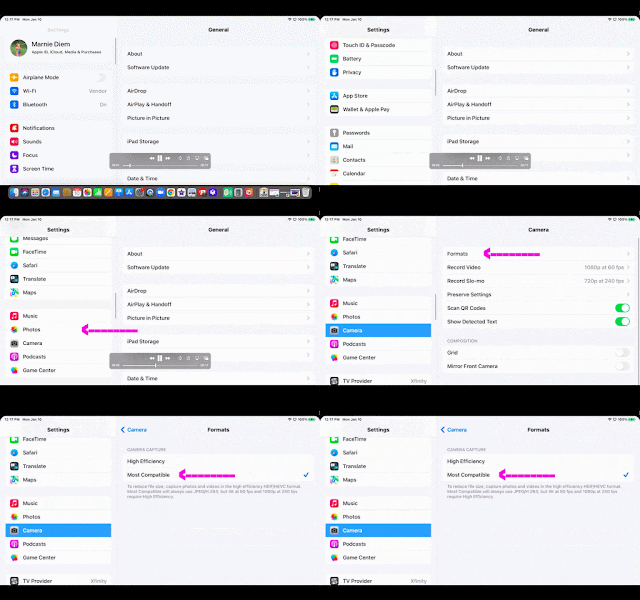
My first attempt literally was a blank... literally drawing a blank. But my second attempt was actually something useful! All our ECC teachers got new iPads right before the December break. And while I did get everything set up, I forgot to do one thing... If you're stuck on how to get your iPhone photos to be more user friendly, and not that HEIC format, check this out -->

It helped me learn how to create a gif, and it helped out my teachers in the process!

I can't wait to see what next week's tech challenge brings!

//


Wednesday, December 29, 2021

2022 Tech Challenge Time!

Last year, I participated in a 10-week tech challenge hosted by the Google Educator Group of Michigan.  Some weeks I revisited forgotten tools, some weeks were a fun task with favorite tools, and some weeks brought me brand new tools!  This year's challenge sign-up closes on Friday, January 7 and I just signed up for the fun!

If you're interested in some ed tech fun, you may want to consider joining.  Here's the deets:

"Your challenge, if you choose to accept it, is to learn some helpful tech tools and earn awesome badges. Each week for 10 weeks I will post an easy and short tech challenge (some of which you might have already done before). Each challenge is posted with my "how-to" steps to help you succeed. 

  • If you complete the challenge you will be awarded that challenge's badge to show off your awesomeness! 

  • If you complete the challenge in the assigned week you will also earn a point to be added to the Leaderboard on the GEG Michigan Tech Challenge website (you will choose a username so others will not know who is in the competition if you want to remain secret)."

Check out the 2022 Tech Challenge website to see what it's all about.  If it sounds like something fun, join the GEG Michigan group and you'll get the link to sign-up!

It's organized by Jeremy Badiner, who, if you haven't seen present, you're going to want to check him out cause he always has fun and informative sessions!

//

Sunday, May 9, 2021

Fun with Fonts

Want a fun and simple way to add a bit of pizzazz to your Slides and Documents? Check out these Text Generators! All are free and web based - the only download is your finished product!  (And perfect additions to end-of-the year certificates and slides and such!)


Cool Text

Text Giraffe


Curve Text


TextAnim


This site let you copy and paste fun text into Google Classroom and such!


P.S.  I learned about these in the GEG MI Tech Challenge.  Look for it next year if you want to join in, too.  It was a blast!


Tuesday, March 2, 2021

Challenge!

For the past two months, I have been partaking in a pretty engaging tech challenge.  Hosted by the Google Education Group of Michigan, each week a new challenge is posted and the goal is to tackle the task, conquer the task, and use the learning with students and colleagues.

The ever-persistent procrastinator that I am, I often leave the challenge until Sunday morning to complete (it's due by 8pm Sunday night) and then find myself down the rabbit hole of whatever the tool of the week is.

Some of the tools have been reviews (Jamboard, EdPuzzle, Remove.bg, Kami).  Some have been reminders (Wakelet, Whiteboard.fi).  But some have been new tools to me (Trello, Whiteboard.chat, and some of the fancy text generators.)

I know I'm a nerd (proudly!) but I love the digital badges that you get for completing each challenge.  I also love that this is a fantastic model of how to successfully use Google Classroom for professional development.

While it's too late to join the challenge officially, you can still learn from the challenges.  Happy Learning!