Showing posts with label tech tools. Show all posts

Friday, February 4, 2022

Tools Galore!

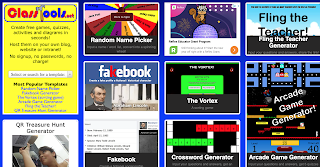
This week's tech challenge was to explore the website ClassTools.net which is a collection of tools that run the gamut from fake tweets and sms text generators to historical tools and puzzle makers.

I've gotta be honest, at first glance, the site isn't much to look at. It's kind of vintage web and a bit cluttered. 
BUT. 

It's also a ton of fun! One of those sites where you're on it for only five minutes, and yet somehow, an hour passes.

Fling the teacher is a customizable quiz game where yes, you can upload any picture and fling away. The Tarsia Puzzle Generator adds a new layer to those triangular puzzles with whatever custom questions a teacher enters. Below are two of the tools that I played with - both super simple and with so many uses in the classroom! 
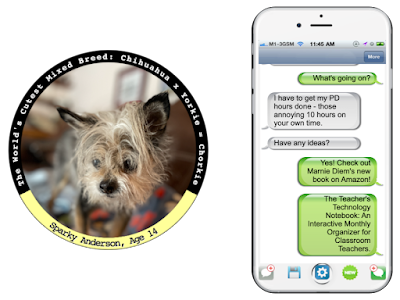
The sample in the badge maker is to use it with historical figures. It can be used for anything you can imagine - from vocabulary to science concepts and anything in between!  The SMS Text Generator would be great for character conversations, foreign language practice... anything the mind can dream of!

//


Wednesday, January 26, 2022

Thinglink

Have you ever seen an image that has different places in which to click? Then you click one of those places on the image and it takes you to a video, another image, a website, or other text? Have you wondered how it was created?

Wonder no more!

While there are a few tools that do this, my favorite is Thinglink.

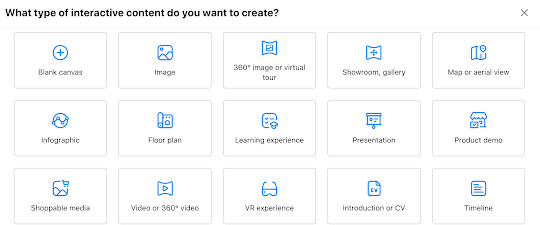
Thinglink is straightforward and intuitive, making using the platform easier than others. In a nutshell, once you login (Google is an option!) you choose the type of interactive "thing" you want to use.  Then you upload your image, click edit, and start tagging.


The possibilities for use are pretty limitless! We've used it to create interactive "Who Am I?" posters in upper grades, with kids linking images, sites, and quotes that represent them. We've used it to create interactive images for teaching. We've used it to create an interactive map, where clicking on one of the cities takes you to a writing piece about that location.

Not only is it a very useful resource to have in your toolbox, it's kind of fun, too!

So? What are you waiting for? Go make your free account and start linking those things!

//


Tuesday, March 2, 2021

Challenge!

For the past two months, I have been partaking in a pretty engaging tech challenge.  Hosted by the Google Education Group of Michigan, each week a new challenge is posted and the goal is to tackle the task, conquer the task, and use the learning with students and colleagues.

The ever-persistent procrastinator that I am, I often leave the challenge until Sunday morning to complete (it's due by 8pm Sunday night) and then find myself down the rabbit hole of whatever the tool of the week is.

Some of the tools have been reviews (Jamboard, EdPuzzle, Remove.bg, Kami).  Some have been reminders (Wakelet, Whiteboard.fi).  But some have been new tools to me (Trello, Whiteboard.chat, and some of the fancy text generators.)

I know I'm a nerd (proudly!) but I love the digital badges that you get for completing each challenge.  I also love that this is a fantastic model of how to successfully use Google Classroom for professional development.

While it's too late to join the challenge officially, you can still learn from the challenges.  Happy Learning!