Thursday, March 31, 2022

Start 'em Young

It is never too early to talk about Digital Safety with children. Never.

Thankfully, there are plenty of fantastic resources available for both parents and educators that explore the complicated and confusing world of Digital Safety. My favorite resource is Common Sense Media, and really, they're my go to for most things educational- technologically or otherwise!

Common Sense has ready-to-go lessons for all grades, ranging in 15 minutes to 45 minutes, complete with activities, interactives, and parent resources. It's the place in which I start when designing activities for our students. Sometimes I only use part of a lesson, sometimes I use the full lesson, and I always use the videos. The videos that Common Sense Education offers are fantastic snippets of lessons that often have catchy tunes. They have clips for all ages, including high school, that are relevant and engaging. Additionally, they've partnered with Book Creator (another favorite!) to bring these lessons to students.

I also love using picture books with all grades to teach Digital Safety. Some of my favorites are linked on the Readings, Resources, and Recommendations tab.

Both first and second grades had Digital Citizenship lessons in March. After all, it's never too early to talk about Digital Safety with children! First grade's lesson was from Common Sense Education's, while second grade got to meet my friend Faux Paw! Both lessons included engaging videos, and both ended with a Seesaw activity.

Using a Seesaw activity to wrap the lessons enhances it in two ways. First, it provides direct practice for students to engage with the concepts in the lesson. Second, it shows families exactly what we've done, and provides them with conversation tools and the family resources. As an added bonus, the kids are super familiar with Seesaw and can interact with it to really showcase their learning!

You can see each lesson on Seesaw. The first grade lesson talks about how using technology makes us feel, and I adapted the emoji game that is included in the lesson so it could be done on Seesaw. Students designed a happy, frustrated, curious, and uncomfortable emoji. I then shared a variety of situations with them, and they had to show the emoji that represented how they'd feel in that situation. The second graders enjoyed the book Faux Paw's Adventures in the Internet, and the animated version with the same title. They then completed a Seesaw activity that sorted activities into "safe" or "not safe."

In first and second grade, Digital Citizenship lessons are peppered throughout the school year, interspersed with coding, games, and curricular content, with the intention to bring awareness to online behavior, how technology impacts people, and overall Digital Safety. We deepen the material appropriately in the older grades. The ultimate goal in the lower grades is to build a foundation of skills on which to build.

When I started in the classroom 20 years ago, I never would have thought that technology would infiltrate the lower grades as deeply as it has. I never expected that my nieces, currently four and seven, would have their own devices but clearly they are not alone in their devices. With that in mind, we need to start educating 'em young so they can building healthy technology habits!

//


Sunday, March 27, 2022

No, not Bottle, BODDLE!

We have a pretty well organized method for ensuring technology tools don't get overused from year to year. This means that each grade band (or community, as we call them) has their own set of core tools, in addition to the tools that span all grade levels.

Some of the school-wide tools include Epic, Flipgrid, and Scratch.

When it comes to math, we are very deliberate in our choices.

Third and fourth grade have been using and loving Freckle as their math supplement tool. They've had it for a few years and it meets their needs well, in addition to engaging the students!

Fifth and Sixth grade use iReady, and a combination of XtraMath and games in general.

Seventh and Eighth grade use IXL for math practice, and have for years. 

We've always been lacking something for our K-2 kiddos, though. We've tried a few platforms here and there, but nothing stuck.

Until Boddle, that is.

Now, I may be jumping ahead (so I'll do a follow up post later on) because we've only been in Boddle land for the past month, but the response is that of looking into puppy dog eyes... yep, we're talking love. The kids love it. The teachers love how engaged the kids are. And I love how simple it is to look at the student practice reports to know how much the kids have played, their progress, and even more importantly, the target areas where there are learning gaps.

The set-up was super simple thanks to Google Classroom integration, and after a sticky first day helping the kids login, everyone was up and running. While Boddle is geared toward K-6, I think K-2 is the sweet spot. The adaptability makes it something the kids can work on independently. Even better, since our K-2 kids are on iPads, the built-in drawing tool on Boddle allows the students to work out a problem directly on screen (and if they're stuck, there's a teaching video right there, too!)

Best of all, Boddle's customer service is truly unsurpassed. They are responsive to teacher requests and constantly updating their platform. Additionally, when I ran into a hiccup last week, I tweeted a question to the Boddle team and got a response in under a minute! Then they even followed up a short while later to make sure everything was working!

Currently, Boddle is free, I do hope it stays that way, at least for teachers! Paid or free, this is definitely a tool to consider adding to your technology toolbox!

//

Wednesday, March 23, 2022

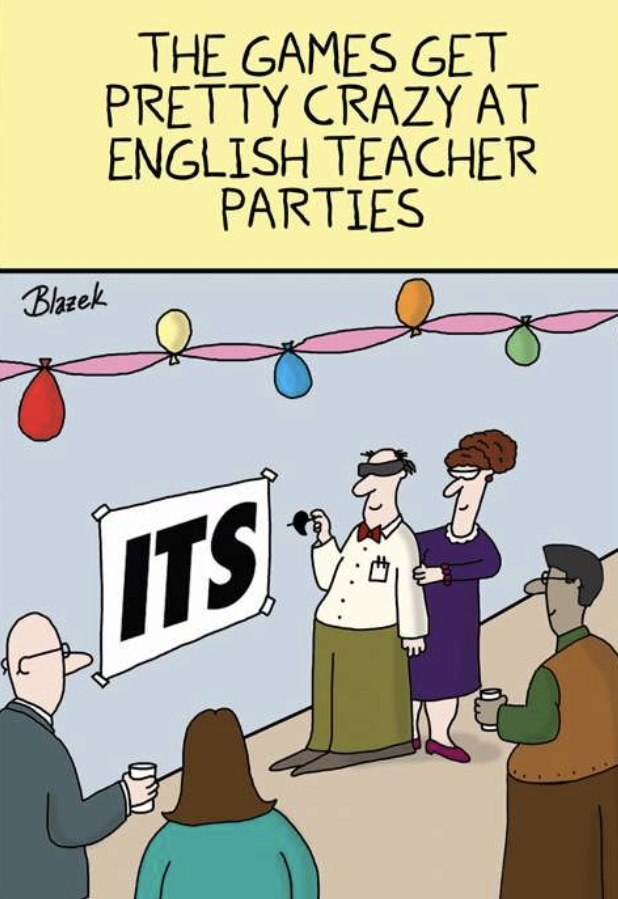
Wednesday Wit - Happy Birthday to ME!

 It's my birthday so I thought it'd be fun to celebrate with some humor...

No, I'm not an English teacher, but I do love a good English teacher hilarity!

Source

If you want to celebrate my birthday, please check out my books on Amazon! 
Purchase one (or both) and leave a review - that's the best gift you could give!

//

Tuesday, March 22, 2022

Flipgrid for the WIN!

We recently hosted our first BIG in-person event, which, ironically happened exactly two years from the last day of school before pandemic life began.

Every year (pre-covid, of course!) the school hosts a huge event called Art and Music Night (or some variation on that title.) Every year each grade performs different songs, there's usually a song or two that the whole school comes together to sing, and the building itself is full of art. Oh, the art!

In years past, we even had interactive art stations that families could explore while they meandered through the building soaking in the artwork from every single class (yep, even the art of math was included!) It was a lovely evening that ended with a concert to remember.

This year, because the planning of the evening happened pre-today's-pandemic-guidelines, we had to err on the side of caution. Students performed only as a grade level. Families came through a guided tour, stopping in location one for an introduction to the evening and a performance by the choir before heading into the art gallery area, and finally ending in the gym for the performance. The schedule was repeated for each of the participating grades throughout the evening. A structure like this ensured that we were able to uphold any Covid protocols while still providing an amazing display of art and music.

Upon arrival, students went to the stage for rehearsal. Which meant they couldn't be tour guides for their families in the art gallery. 

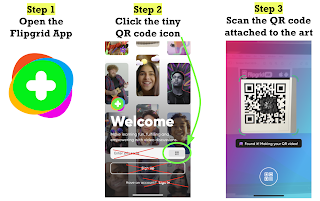
Alas, Flipgrid AR!

Yes, it was a bit of a daunting task, recording 166 student videos onto five separate grids. Tracking kids down who were on quarantine, ensuring every child's art piece was the one they had chosen, all those little details were quite a clutter-causer.

It. Was. SO. Worth. It!

Parents came into the art gallery portion and had (hopefully, per directions sent ahead of time!) downloaded the Flipgrid app already. They found their child's piece and voila! Their child popped off the screen and gave a personal introduction to the art piece!

Now, nothing will replace the actually child being there live and in person, but Flipgrid AR made for a pretty amazing substitute!


Sunday, March 20, 2022

MACUL 22 - Complete!

Not gonna lie. Driving to MACUL 22 was nerve-wracking. I was definitely feeling the anxiety trying to take over, and my brain filled the closer I got to Grand Rapids. I checked in, dropped my bags off in my room, and headed over to my first session (Google Updates) for the conference. As soon as I crossed the threshold from the hotel into the covered walk to the conference center, my heartbeat was louder than any other sounds.

And it all went away as soon as I got my badge. 

It was as if I never skipped a beat. And you know why? Because MACUL never skipped a beat. The conference check-in was more streamlined and the chairs were a little farther apart than in the past (thank you COVID.) The energy was the same, if not a bit louder, actually, because everyone was so excited to be back together!

(Well, that's not completely true. MACUL, like all of us, skipped a lot of beats and made a lot of side steps and alternate plans over the past two years. And I did wear a mask except when eating or presenting. But when we all got back together at the conference center? It. Felt. Great!)

As usual, there were SO many sessions from which to choose and every single one I attended was full of tidbits and fun. I learned a few years ago that while notes are really helpful (and yes, I still took a ton) if I tweet my notes, it keeps me more concise and focused, and then those #NotAtMACUL can get some tidbits, too! After all, I get so many nuggets of wisdom from others on social media.

Highlights:

  • Reconnecting with some of my favorite presenters - Leslie Fisher, Nick Provenzano, and Joe Sanfelippo to name a few. I attended Leslie's Gadget session and Cup of Joe with Dr. Sanfelippo and felt so inspired, motivated, and happy!
  • Meeting up with friends from past MACUL conferences, meeting some of them for the first time since we "met" at the MACUL virtual conference last year!
  • Learning from new-to-me presenters like Jennifer LaGarde - so many amazing tidbits about living and learning in this "infodemic."
  • Meeting Joe "Mr. D" Dombrowski (Remember that teacher who had the amazing April 1st spelling test? Yep, that's him!)
  • Live music when I was still half asleep was a great way to wake up!
  • Kilwin's within walking distance....
    And last but not least:
  • Being among my colleagues again - being in a department of one has it's benefits, but it's always nice to connect with those who are in similar roles elsewhere.
More tidbits will be unpacked over the coming weeks, but for now, enjoy my MACUL22 experience in under two minutes: