Showing posts with label apps. Show all posts

Friday, January 21, 2022

Math Is EVERYwhere!

Earlier this week, a first grader asked why we seem to be playing so many math apps during tech time. I told her that it's because everything, everything, EVERYthing is math! The answer satisfied her curious mind, and so I proceeded to introduce the new math app for the week.

The truth is, math is one of the simplest subjects in which to integrate technology. There is a plethora of math apps solely for fact practice (some rock, some sink) and there are even more apps that work in the problem solving realm. In my head, knowing problem solving is a critical skill, I strive to find engaging ways in which kids can practice.

Some of my favorite math apps are (in no particular order!)
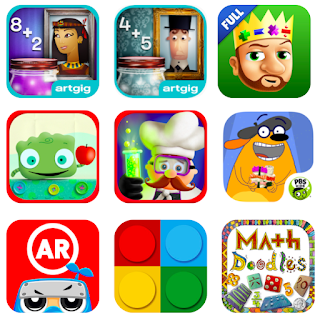
Mystery Math Museum

Mystery Math Town

King of Math and King of Math Jr

Tiggly Addventure and Tiggly Chef Subtraction

Fetch Lunch Rush

Math Ninja AR

Math Brix

Math Doodles

The majority of these are problem solving games that reinforce basic math facts, all with a little twist. Math Ninja AR and Fetch Lunch Rush use physical movement to engage the kids. Mystery Math Museum and Mystery Math Town incorporate a story and (obviously) mystery element. King of Math and King of Math Jr are great for logic exploration at all levels. Math Brix brings in the good ole' fashioned lego blocks to supplement. Math Doodles is a personal favorite, because it takes me back to the fun of a game we used to have in the computer lab back in the day, Math Arena, and because it's doodle style imagery and animation make it memorable for kids exploring concepts like symmetry, angles, and more.

In addition (notice the math pun!), if you have access to an Osmo kit, their math games are unsurpassed - Numbers, Tangrams, and the newer, Math Wizard sets, make screen-time tangible!

As an aside, the game we played in first grade this week was called Math X Creature. To help make direct connections to their math lessons, the kids first completed a practice activity in Seesaw. I created it using screenshots from the game, and then we walked through the slides together to practice. It made the game waaayyyy smoother for the kids to play! I love the game because it is self-correcting, and it challenges the kids to think differently as the work through their math facts.

Yes, most of these are iPad and tablet apps, but some have versions that work on the web, so definitely consider spending some play-time exploring!

//


Wednesday, April 7, 2021

Common Sense

Common Sense.

Some people have it, some people don't.

And whether or not you have Common Sense, you need to know about one of my favorite resources, Common Sense Media.

I've talked about it before, and it is a resource worth mentioning again.  Whether you're a parent, educator, nanny - anyone who interacts with children and young adults, this is a site to bookmark.

And they have a program that allows educators, schools, and districts to become Common Sense Recognized.  This means that the educator, school, or district are committed to providing opportunities for students, staff, and school community members to "harness the power of technology in the classroom and beyond."

Two key takeaways -

1) Parents, teachers, caregivers - anyone working with children and young adults - can go to the Common Sense Media website and find reviews and evaluations on everything from apps to websites, books to movies and TV shows, all that can help determine if they are appropriate for the group.

2) The Digital Citizenship curriculum CSM developed is super friendly for teachers to use, and as a bonus, has a great home connection for parents and guardians.  If you're not using it in your school, it is worth looking at.  If your child's school isn't using it and you're a parent, it's also worth looking at.

It can be so challenging, especially today, to sort through all the chaos and get to the crux of things - use the Common Sense Media site to simplify things a little!  Want to show a movie in class?  Read the CSM reviews first.  Want to check out the latest app the kids are all talking about?  Read the CSM reviews to find out if you should look at ways to integrate it into class. 

I recently completed the requirements to become a Common Sense Educator (and am quite proud of my new badge!) If like me, you find yourself constantly referring to CSM, take a peek at their programs - it will be worth your time!

//

Wednesday, November 6, 2019

Mercy Tech Talk

I had the privilege of attending not one, but two conferences in the past 7 days.  Yes, I am that lucky!

On Friday, November 1, I spent my day at Mercy High School's Annual Tech Talk Conference.  After sharing some wisdom on Google tools, I spent a session with Director of Curriculum Innovation, and Grants for RCSD, Jason Gribble.  He talked about the importance of leadership coaching and modeling teacher expectations.  We looked at some great tools to support communication (newest Voxer fan here!) and talked about how Twitter Chats can profoundly impact one's learning network. among other things, entertained with some pretty funny video clips that are all too real in the world of educational leadership!

After a delicious lunch of tacos (something I am only now learning how to eat in public!) I spent an hour with Jeremy Badiner.  An hour with Jeremy is never long enough, and always goes way too fast!  This particular session focused on tools to expand the ever-changing tech toolbox, and I think I might need to build a bigger garage to hold all these tools!

Here are a few of my favorites!


Mercy Tech Talk is a local (Farmington Hills, MI) conference hosted by Mercy High School.  They do a fantastic job showcasing all layers of education - from student presentations to engaging workshops.  Look for it next November if you're in the area!


Tuesday, March 12, 2019

Do. Not. Stop. (the) Motion!

Third graders are in the midst of a geography unit right now, which is always fun.

What is even more fun, though, is one of the ways they share their knowledge.  See, each student researches one state in the country.  They learn a variety of facts about the state, from natural resources, tourist attractions, business, etc.

The teachers found this really cool giant map of the country, where each state is it's own piece of the puzzle.  The pieces are about the size of a letter size paper, and are made out of sturdy cardboard.

Kids decorate their state and.... the best part....

...they create a stop-motion tour of the state using the free Stop Motion Studio app on the iPads.  The kids bring in their own mini-figure of sorts from home - whether it's a lego or a L.O.L doll or what not.  Scripts are written to include the key facts.  Finally, the tour is created!

Now, we're not ready for that project yet, bbuuuuuttttt, we had our introduction to stop motion the other day and the kids did SUCH a great job!  Each group had the same tools - a clothes pin and a large piece of construction paper - and had to use those tools to practice with the Stop Motion Studio app.  They got quite creative, too!

If you haven't tried stop motion, and you have access to an iPad or tablet, it's easier than you might think!


Tuesday, February 12, 2019

Plugo Count: Life of Theo

Now that Plugo has been unboxed, and I've gotten a few bonus days (thank you, Mother Nature, but I'm ready for a full week of school again!) it's time to explore the apps of Plugo.

I started with Plugo Count: Life of Theo.  On the plus side, it's a great opportunity for students to interact with number stories in a more engaging way than the standard pencil paper practice.  Plugo does a nice job with simple animation, relatable number stories, and setting a purpose for the practice.

Theo is introduced as a 6 year old boy from Denver, which may make it a little young for older grades.  I do have my app set up to be used by third grade, so I'm not sure if his age/story adjusts for the age of students.  At any rate, 6 may be a bit young for third graders, but we'll see.

The concept is great.  Theo has to practice his math and is working to balance fun and learning.  Unfortunately, even with the great concept, the actuality of it isn't quite working.  While there was an update pushed out prior to the making of this video, even after trying it with the update, the app is still struggling to read the digits.  I am hopeful, though, that this is just the beginning and more improvements are ahead!