Monday, January 31, 2022

It's a Comic!

First time in a long time that I made a comic in Pixton! It was super simple, easy enough for even kids to use!

The week three challenge in the Google Educator Group of Michigan Tech Challenge was to create a comic with Pixton, and I loved revisiting this tool. There are so many ways that using comics in the classroom can enhance learning for kids and teachers alike. From creating graphic novels, which require concise and deliberate word choice to convey a message, to depicting science experiments, I have yet to meet someone who is not a fan of creating their own comics.

Check out the Teacher's Guide to Tech, it is very handy to have on hand!

Pixton has a one week free trial, and pricing for individual teachers and classroom by the month or by the year. You can also get a quote for school-wide use. Login is simple with Google or Microsoft (or even Facebook for older kids) making this tool great to integrate into teaching and learning.

Friday, January 28, 2022

Westward Ho!

When I was in the classroom, the 4th grade immigration unit was one of my favorites. Exploring the impact of other cultures and histories on our life and community fascinated me, and my students.

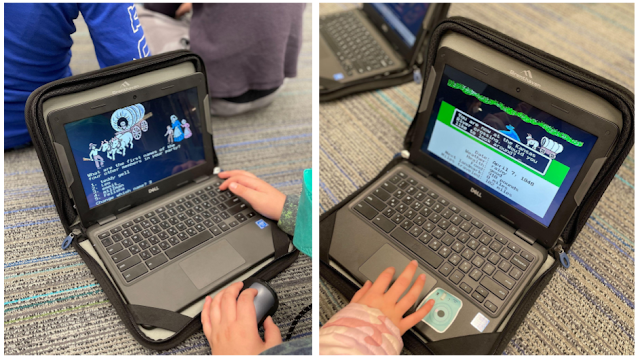
Every year, as part of their studies on the great state of Michigan, our 4th graders dive into Westward Expansion. They explore the concepts of movement, immigration and emigration, and challenges people faced as they ventured into their new lives.  There are many tech components to this unit that I love, one of my favorites being what the kids got to (finally) explore - The Oregon Trail! No, we're not talking the new fangled version, we're talking the Trail of the good ole' days. And thanks to a MECC simulator on the Internet Archive, they're playing just like I played when I was in 4th grade!


You get to go through the same experience - choosing your profession, the time to travel, and setting up your wagon party. Decisions must be made about items to purchase, how fast to travel, and how satisfying to make the meals. Fred broke a leg? Harry has dysentery? Whatever will you do?  

This year, though, the teachers found an addition to the experience - an Oregon Trail pre-game simulation, where the kids had to talk through their options and make a decision on each of the choices they would be exposed to in the game. They were then awarded points based on their answers. This activity prepared them for the game on a new level - they knew what they were getting into, they were able to make more informed choices, and both of those things only enhanced the fun of the play!

Well? What are you waiting for? Go waste some time revisiting childhood on The Oregon Trail!


Wednesday, January 26, 2022

Thinglink

Have you ever seen an image that has different places in which to click? Then you click one of those places on the image and it takes you to a video, another image, a website, or other text? Have you wondered how it was created?

Wonder no more!

While there are a few tools that do this, my favorite is Thinglink.

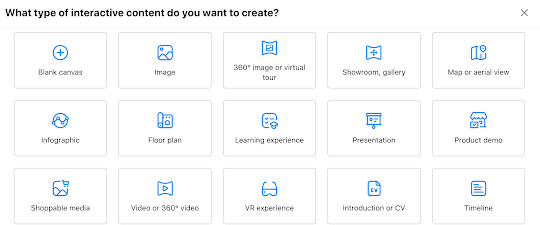
Thinglink is straightforward and intuitive, making using the platform easier than others. In a nutshell, once you login (Google is an option!) you choose the type of interactive "thing" you want to use.  Then you upload your image, click edit, and start tagging.


The possibilities for use are pretty limitless! We've used it to create interactive "Who Am I?" posters in upper grades, with kids linking images, sites, and quotes that represent them. We've used it to create interactive images for teaching. We've used it to create an interactive map, where clicking on one of the cities takes you to a writing piece about that location.

Not only is it a very useful resource to have in your toolbox, it's kind of fun, too!

So? What are you waiting for? Go make your free account and start linking those things!

//


Friday, January 21, 2022

Math Is EVERYwhere!

Earlier this week, a first grader asked why we seem to be playing so many math apps during tech time. I told her that it's because everything, everything, EVERYthing is math! The answer satisfied her curious mind, and so I proceeded to introduce the new math app for the week.

The truth is, math is one of the simplest subjects in which to integrate technology. There is a plethora of math apps solely for fact practice (some rock, some sink) and there are even more apps that work in the problem solving realm. In my head, knowing problem solving is a critical skill, I strive to find engaging ways in which kids can practice.

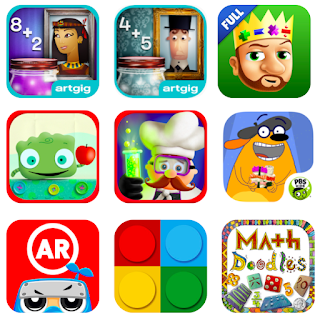
Some of my favorite math apps are (in no particular order!)

Mystery Math Museum

Mystery Math Town

King of Math and King of Math Jr

Tiggly Addventure and Tiggly Chef Subtraction

Fetch Lunch Rush

Math Ninja AR

Math Brix

Math Doodles

The majority of these are problem solving games that reinforce basic math facts, all with a little twist. Math Ninja AR and Fetch Lunch Rush use physical movement to engage the kids. Mystery Math Museum and Mystery Math Town incorporate a story and (obviously) mystery element. King of Math and King of Math Jr are great for logic exploration at all levels. Math Brix brings in the good ole' fashioned lego blocks to supplement. Math Doodles is a personal favorite, because it takes me back to the fun of a game we used to have in the computer lab back in the day, Math Arena, and because it's doodle style imagery and animation make it memorable for kids exploring concepts like symmetry, angles, and more.

In addition (notice the math pun!), if you have access to an Osmo kit, their math games are unsurpassed - Numbers, Tangrams, and the newer, Math Wizard sets, make screen-time tangible!

As an aside, the game we played in first grade this week was called Math X Creature. To help make direct connections to their math lessons, the kids first completed a practice activity in Seesaw. I created it using screenshots from the game, and then we walked through the slides together to practice. It made the game waaayyyy smoother for the kids to play! I love the game because it is self-correcting, and it challenges the kids to think differently as the work through their math facts.

Yes, most of these are iPad and tablet apps, but some have versions that work on the web, so definitely consider spending some play-time exploring!

//


Tuesday, January 18, 2022

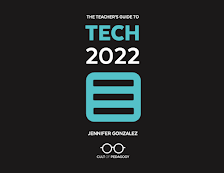
It's Here! It's Here! The 2022 Teacher's Guide to Tech!

For the past several months, me and a team of four other fantastic (female!) tech educators have been working with Jennifer Gonzalez (yes, *that* Jennifer Gonzalez, of Cult of Pedagogy) on her annual publication of the Teacher's Guide to Tech.

And it's finally here!

It has been so much fun working on the Guide - checking all the tools that were previously included to ensure the descriptions and images are still accurate representations of the tool. Then, checking all the video links to make sure they still worked, replacing them with updated links where possible.

The next step was reviewing new tool suggestions that have been collected over the past year. Some were amazing additions, some were already in the guide, and some need another year to grow (and were stowed away for a revisit next year!)

All sorts of behind-the-scenes magic happened next, cross checking links, creating the reference section, the index, and so on. It was a lot of work.

And it's finally here!

Do yourself a favor and head on over to The Teacher's Guide to Tech and grab a copy! Listen to the podcast while you're at it, and you'll hear me and the rest of the incredible Tech Guide team sharing our favorites from this year's guide!

P.S. Be sure to follow Cult of Pedagogy on Twitter for all sorts of tidbits throughout the year!

//