 |
| If this is your image, please let me know so I can give you credit! |

Wednesday, May 10, 2023

Monday, May 1, 2023
Canva
Have you heard of Canva? If you haven't, you are missing out! Canva is on fire these days, complete with their own AI tools built right into the platform! It's my new favorite go-to for anything graphic design (sorry Google slides) and especially for creating things with images

Not only can teachers use it, but students can navigate and create in Canva, too! Even better, teachers get a free Canva Educator account, which includes access to the pro library of resources. It also allows teachers to create classes (similar to Google Classroom) and assign projects to students and groups of students, because, yes, you can collaborate on Canva!
Check out the Canva overview below - it's a great intro to this awesome platform.
Note this video is a few years old, but still solid for the basics. Canva has a self-paced tutorial once you create an account. That will have all the new bells and whistles!
//
Wednesday, April 19, 2023
Monday, March 27, 2023
PD Junkie
Hi. My name is Marnie and I'm a PD Junkie.
I love learning.
I love the opportunity to attend {meaningful} PD - live, conference, webinar, recorded - anything. In fact, I just registered for another webinar being held later this week. Another because I already have one scheduled for tomorrow.
The question is, how do I "hold on to" all that I'm learning so that I can share it with others in my quest to help them bring their curriculum to life?
I talk about it. I talk about what I've learned with colleagues, family (thankfully my sister AND sister-in-law are both teachers, too) and anyone who could possibly learn from what I've learned. BUT I don't talk too much, I don't want to bore anyone!
One of the biggest things I've learned is that after each webinar, conference session, training, or any PD really, I have to press pause and let the synthesis happen. It's in that pause that I think deeply about what I've learned and how I can apply it to my job.

These days, it's so easy to step into the rabbit hole of learning and let yourself fall for each shiny new item that is shared. The challenge is in that pause. Is the tool one that will assimilate into what you are doing, or is it another thing that teachers will have to "do" during their already overstuffed days?
I recently got back from the MACUL conference (more about that another time) and went to only three sessions, but each of those sessions was so powerful I was mesmerized. As a PD junkie, it's easy to get sucked into going, going, going. I'm finally starting to become more discerning about how I spend my (valuable) time.
See, there are literally free (and low cost) webinars for educators DAILY. Yes, you read that right. If you look, you'll be able to find a new webinar to attend every weekday. That would be PD overload. Instead, find the ones that speak to you, that hold promise of something you're looking for.
I'm a PD Junkie, take it from me....!
//
Wednesday, March 8, 2023

Wednesday, February 22, 2023
Tuesday, February 7, 2023
Tangible Tech
When teachers are planning, I'm the first one to say "If it can be done more effectively while unplugged, do it." We need to face facts - sometimes the "old fashioned" way is better than high tech.
Sometimes, though, you can blend the two.
Especially with the younger kids.
This post features some of my favorite tangible tech experiences that include hands on components, not just screens.

#1 - Osmo
By far my favorite tech toy for younger students... or really, all age students! Osmo takes the table in which the iPad/tablet is sitting and makes that table interactive. Using a periscope style device, Osmo has more than a dozen different learning games that students can play with, including tangrams, number and letter tiles, maps, coding, and even pizza toppings! I've blogged about Osmo several times but I will never tire of sharing this incredible platform.

#2 - Tiggly
If you are lucky enough to find a Tiggly set, they contain either number rods, vowels, or shapes. The tangible sets are amazing because you stick them right on the tablet screen and the apps "read the screen!" The Tiggly apps do not need the tangible sets to play, instead students use their fingers to engage with the games. My favorite game is Tiggly Chef Subtraction - if the kids need to subtract four, they put four fingertips on the screen. It's kind of hard to explain, but lots of fun to play! Oh, did I mention all the apps are free?!

In particular, the SquareLand and Phonics Playset. Remember those magnetic letters that were a childhood rite of passage for refrigerators? Well, this playset uses a letter tray where not only are letters recognized, the platform recognizes whether letters are facing the correct direction. It's a fantastic way to explore letters and phonics and basic site words beyond just clicking a screen. Plus, the reading games are adaptable, adjusting to how well the child is doing with the platform.

Plugo has a unique twist on tangible games, with sets that involve STEAM and letters and numbers and puzzles and even a piano! Connect your tablet to Plugo's Gamepad and the sky is the limit. The Gamepad spaces things out and directs kids where to place objects. Whether you're placing the piano or the number spikes, you can clearly see where things go. There are eight different game sets for Plugo, each with it's own apps and storyline. All are engaging, hands on, fun!
There is a whole genre of screen-free tech toys, too, but that is a totally different post!
Monday, January 30, 2023
ChatGPT
Have you heard of this new tool that has turned education on it head? Unless you live in an unplugged world, you probably have.
What is ChatGPT?
It is a creation of OpenAI, and as of this podcast, is currently free to explore. In fancy terms, it is a chatbot that uses a language model called GPT-3 which means Generative Pre-trained Transformer 3 to simulate conversations with users. It was released in November 2022.
In plain English, it’s a very, very cool tool to have in your pocket.
When I found it, it was full on panic mode, I mean, this was going to change writing education forever! But, after I got over my panic and fear, I started settling into reality, meaning ChatGPT and tools similar to it will be filling our future. What feels unreal now will be an everyday experience in the “then.”
Over the past few weeks, we’ve asked the bot to do countless things for us at school - write essays, yes, but we’ve also used it as an Alexa, just asking it questions. A really neat try was when we asked it to write a decodable short story using a specific vowel pattern to use with 2nd grade and it did it!
ChatGPT has taken the educational world by storm. If we focus on the fear it’s raised, we’ll be in trouble. As long as we keep looking for productive, positive uses, it could really have a positive impact on education.
//
What is ChatGPT?
It is a creation of OpenAI, and as of this podcast, is currently free to explore. In fancy terms, it is a chatbot that uses a language model called GPT-3 which means Generative Pre-trained Transformer 3 to simulate conversations with users. It was released in November 2022.
In plain English, it’s a very, very cool tool to have in your pocket.
When I found it, it was full on panic mode, I mean, this was going to change writing education forever! But, after I got over my panic and fear, I started settling into reality, meaning ChatGPT and tools similar to it will be filling our future. What feels unreal now will be an everyday experience in the “then.”

zIt is true. ChatGPT is unreal in the sense that it uses AI to write essays, short stories, plays, you name it. Everyone I’ve spoken to instantly thought of those college essays required with most applications and were speechless when they learned of this bot.
The scary part is that it does a really good job of composing what you ask of it, and because it uses AI, it’s technically not plagiarism, and therefore is not traceable by the standard plagiarism checkers. This brings up the ethical question of cheating… since it’s technically not copying… and is creating original work… does this mean students would have to disclose that they used ChatGPT?
Once I switched into problem solving mode and went looking for ways this tool can be useful to educators, I found some really phenomenal uses for the bot. Even further, speaking with colleagues and perusing social media brought about a plethora of positive uses, which made me feel so much better about this crazy tool.
A colleague said that while she wouldn’t want her son using ChatGPT, she herself could use it to learn about what her son was studying, and therefore be better equipped to help him with his homework.

We also talked about how if we were at a meeting and the presenter shared something we hadn’t heard of, (which never happens!) we could again go to the bot and ask it to teach us about that topic.
Another teacher decided to have the bot write a play on the Golem, a topic his class had just wrapped. The bot wrote the play and the class read it. They then had it write a second play, and compared the two. Finally, he had the class add missing details to the play to make it a richer read.
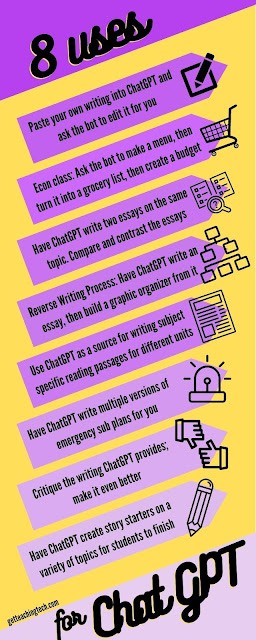
On the socials you’ll find countless ways teachers have found to use ChatGPT. In fact, here is an infographic that shows eight ways teachers can use ChatGPT in the classroom.
Over the past few weeks, we’ve asked the bot to do countless things for us at school - write essays, yes, but we’ve also used it as an Alexa, just asking it questions. A really neat try was when we asked it to write a decodable short story using a specific vowel pattern to use with 2nd grade and it did it!
ChatGPT has taken the educational world by storm. If we focus on the fear it’s raised, we’ll be in trouble. As long as we keep looking for productive, positive uses, it could really have a positive impact on education.
Tuesday, January 24, 2023
Formative Assessment + Kahoot = Wowza!

We played a writing review game that covered the basics they've been practicing in 2nd grade writing. It was super easy to put the Kahoot together, took about a half hour, which is less time than it would have taken to make a paper/pencil review.

Each teacher did ask for the results of the Kahoot when we were done (which Kahoot provides.) Once they get the answers, it's like having a Formative Assessment right in their hot little hands!
Kahoot is SO easy to use for Formative Assessment! Whether you make your own Kahoot or you use one of the thousands and thousands of pre-made Kahoots (as of this moment there are more than 40 million ready-to-use Kahoots!) The best part about using Kahoot for Formative Assessment is the level of engagement soars! The kids are so tuned into the game, and regardless of whether or not they know it's a review quiz or not, they (at least the kids I work with) love playing!
One more tidbit about Kahoot - you can use it as a pre-assessment, too, if you want! Pose the Kahoot in such a way that you know the kids don't know this "stuff" yet because you haven't taught it. You want to see what they know before the unit starts. Then, play the same Kahoot again (ghost mode!) and see how everyone did before the unit and again after the unit!
However you choose to use it, Kahoot is a fantastic (and completely FREE) tool (with upgrades availalbe) that you can use tomorrow. Heck, you could use it today if you're reading this post in the morning!
//
Wednesday, January 18, 2023

Wednesday, January 11, 2023
Transfer of Skills
My goal as a technology coach is that when I share a tech tool with teachers, and model that tool with their students, and create lessons with the tool that teachers can then (hopefully) take the tech tool and begin using it on their own. Transfer of skills.
As a technology teacher, when I push in for tech with the kids, my hope is that the technology skills we explore transfer into their daily learning. This is most prominent when we're coding - problem solving, perseverance, breaking problems into smaller chunks to solve, debugging (looking for errors) are all coding skills we practice. The hope is that students take those experiences and feelings (the feeling of being successful in breaking a problem into smaller chunks) into their reading, writing, and 'rithmetic. Transfer of skills.

Recently, I was filled with warm fuzzies as I watched this transfer of skills happen twice in one week! And at opposite ends of the building, too!
8th graders have a big unit every December called Campaign for a Cause where they research different local causes and try to persuade their classmates to vote for their cause. This unit involves watching and creating PSAs. The 8th grade team was blown away by the transfer of skills this year in the PSA making. The kids took ideas directly from the PSAs they watched and embedded them into the created PSAs. Taking that one step further, the winning Cause created a second video that also followed what they had learned, further solidifying the learning.

Transfer of skills.
Wednesday, January 4, 2023
Stay Safe Online
That's the title of the books, or at least most of the books, that the 4th graders wrote as for their summative project of their Digital Citizenship unit. Working in groups of two or three, students had to search their brains for online safety tips they gathered over the duration of the unit and put that to good use: teaching other kids!
Linked below you'll see their books, created using Book Creator, and we hope you and your students can learn something from reading them!

Wednesday, December 21, 2022
Fitting In
I so vividly remember an experience in first grade, it was sometime in the winter, and it was grandparents day. I was so sad because I didn't have grandparents in town, so I was going to be the only kid in my class without someone visiting me. Lo and behold, my neighbor, Alma, surprised me by filling in as my surrogate grandparent. I was thrilled. I wish I could get my hands on the picture of the two of us that day.
Another vivid memory was in Kindergarten, when my school set up a Santa's workshop store and we got to go buy gifts for our family members. Having spent my preschool years in a Jewish school, I was more than a little miffed that they only had Christmas stuff, which made it very hard for five-year-old me to shop for my family.

I work in a Jewish Day School. After spending my whole educational career (really, my whole life) being a minority in schools that are "neutral" yet Christmas is covertly-obviously the center focus, I am surrounded by Jewishness. The school is decorated for Chanukah, everyone gives and receives Chanukkah gifts, kids and teachers alike dress in Hanukah garb... all of it.
And I fit in.
I'm not the minority. And it feels so good to belong.
For us educators, this speaks to the importance of building relationships with our kids. Maybe we are more precise with our language to be inclusive of all celebrations. Maybe we are more thoughtful with our classroom decor this time of year (and all year, really.)
Now, I know there are hundreds of thousands of others that feel how I did, and feel how I do. My hope this holiday season is that everyone has the chance to experience what it is like to fit in, to be in the majority, in a place where they spend a majority of their time.
Warm holiday wishes to everyone who celebrates a special time this time of year!
P.S. Yes, Chanukkah has a zillion different spellings. This post used several options!
Wednesday, December 14, 2022
Adventures in VR
Well, we finally got our VR goggles updated and running and the 6th graders finally got to watch their space creations come to (virtual) reality!
Now, it wasn't the smoothest roll-out, but it was worth all the bumps in the road to make it happen. Last month, our 6th graders used CoSpacesEDU to create their own explanation of concepts explored during their space unit. They studied the solar system, gravity, and the patterns created by the interaction of the sun, moon, and earth, and had to show these concepts on CoSpacesEDU.
We spent a full month updating the goggles and reconnecting them to the network as they have sat untouched since COVID. Thankfully, despite having the older goggles (these are now six years old!) we were able to work with ClassVR to get our account up and running again, and transfer the work done on CoSpacesEDU to the ClassVR portal.

The kids had a blast. They loved seeing their creations come to life! Riding the roller coaster one group made, watching the planets bounce around in a solar system without gravity made by another group - it was lots of squeals of laughter and fits of giggles. We did learn (the hard way) to give your eyes and brain a break every five minutes or so, as the VR world takes a toll on both!
Thursday, December 8, 2022
Hour of Code Week 2022
Hour of Code week is a week I look forward to every year. This year was extra exciting because Code.org published new Hour of Code videos! The one linked here is the one I showed the 2nd - 4th graders, since they've seen HoC videos before. (I found an older one that was more explicitly code-connected for 1st grade.) They are always in awe of seeing celebrities and athletes that are coding!
Here's our lineup this year:
- 1st graders got to play CodeSpark's The Foos, which is one of my favorites. I love the simple and engaging format for the kids, and the graphics and storyline are unsurpassed! The kids always giggle at the "tushy dance" when the beat a level. It does a great job teaching perseverance in a kid-friendly way.
- 2nd graders got their Code.org accounts and were super excited to code like "the big kids" get to code. They worked their way through Level B and were so proud of themselves! I love how this level uses directional words - north, south, east, and west - along with the arrows in the blockly code.
- 3rd graders coded a 3D T-Rex game from the Hour of Code site. It was so much fun watching them code each step of the game, and the grins that covered their faces with each success lit up the room. If they finished coding the game, they moved on to Code.org to pick up where they left off in Course C, a perfect step up from course B.
- 4th graders got their Scratch accounts and started Scratching their way toward video game design, which is their final tech project at the end of the year. To kick off our Scratch adventure, we coded our initials, making them bounce, spin, and dance.

Monday, November 28, 2022
MI Google

In general, I'm quite a PD junkie, and I love attending just about any Professional Development I can, virtual or in person. I'm grateful that I'm able to attend so many different PDs whenever I find any that catch my attention, and strongly encourage any educator to attend whenever they are given the opportunity!
MI Google is one of my favorites because it's on the smaller side (200ish attendees) vs our big MACUL Conference (3500ish attendees) vs the huge ISTE Conference (10000ish attendees). I like the size because you can connect directly with the presenters after they finish a session. I know that I love connecting with those who attend my sessions to be able to discuss a concept brought up, answer any questions, and so on.

PD, or at least good PD is a gift for all educators. It doesn't have to be a massive conference, it doesn't have to be a conference at all, to learn and become re-inspired! (And if you have the chance to go to an EdCamp, don't miss it!) Some of the best learning I've experienced as an educator is through workshops provided by my local ISD. The bottom line is that when given the chance to go, despite the groans of writing sub plans, if there is something of interest to you, do it. You'll grow as an educator and as a person, and let's face it, that change of scenery, even for one day, is always a treat!
//
Wednesday, November 16, 2022
Chattering via Chatterpix

Our second grades complete a Thanksgiving persuasive writing project each November, the fairly popular one where they disguise a turkey so it survives the holiday feast. A few years ago, we decided to add in a technology component, where they use Chatterpix Kids to make their turkeys "talk." This year, I got smart. I had the kids do a practice Chatterpix, going from start (taking the picture, making the turkey talk) to finish (uploading it to Seesaw) and what a difference that made!

Past experience has shown that when we practice at this level, the actual project works much smoother. We'll have to wait and see!
Monday, November 7, 2022
CospacesEDU in SPACE!
We've played around with CoSpacesEDU many times over the past few years. The 7th graders have been doing a very cool project that involves recreating a capital city, and we've dabbled in other areas, too.
But this is by far the coolest project we've done thus far!
6th graders spend a good deal of time exploring space. They dive into gravity, seasons, weather, planets, and a ton more. We decided to take a risk and really dive into space using CoSpacesEDU AND ClassVR.

6th grade students created their own space exploration where they had to teach a concept or two from the unit. Even better, we're going to be exploring those Space(s) on the ClassVR headsets! They got super creative, too. One group created a roller coaster for each planet. Several groups have sounds playing in the background to add ambience. One group brought in a rocket launcher (virtually) that blasts the project off into space, literally!

I'm super excited for the headset viewing party where they'll experience each other's world's in virtual reality. The headsets should be ready soon!
Thursday, October 20, 2022
Digital Citizenship + Seesaw Lessons
If you are a Seesaw user, you have to check out the Seesaw Lesson Library. There are SO many ready-to-go lessons that are standards-aligned, engaging, and just plain fun!
My first visit to the lesson library was in search of Digital Citizenship resources, since we were heading into Digital Citizenship week. I stumbled upon the cutest little character, Bean, and his friend Mallow, who teach kids all about Digital Leadership. There are a total of nine lessons in the Digital Leadership library, and we went through the first two with second grade.

The kids loved them. I loved them. I love that the lessons are scaffolded in such a way where there is a whole class activity, an independent practice, an extension or reflection piece, and a home connection. It's all built out for you! Additionally, it's totally accessible for both English and Spanish, with audio tags throughout the pages to read everything to students.

The only suggestion I have after working with the Lesson Library is that if kids are on iPads or tablets it definitely helps to have a stylus and headphones. Well, if kids are on any device the headphones help! We ended up listening to the lesson on the Smartboard and the kids completed each page on their iPad.
There are lessons for a ton of other subjects, too, from phonics to math to science and more! The lessons are an added cost on your Seesaw license, and they always have a few free ones to try out before you buy.
Wednesday, October 5, 2022
Keyboarding Revisited

Side note: we learned from last year that passing out stickers for every typing star became quite a commotion. Now they get their first sticker at 100 typing stars. Way more manageable!

When I'm teaching, I can quickly tell who is practicing their typing vs who has not continued once they earned their basic stars - responses in PearDeck and Seesaw come much smoother from the typers. Plus, it's a great way to start the year - low stakes tech practice while the kids are learning to navigate their new class.
Subscribe to:
Posts (Atom)